Saturday, June 15, 2019

Javascript


Java script is used to programme the behaviour of the website. Its easy to handling and a developer should learn this language.

What is javascript? 
Javascript is a scripting language, mostly used on the web. It's used to increase HTML pages.
commonly found in embedded in Html code. Javascript an interpreted language. Thus, it doesn't
need to be compiled. Javascript renders the web pages by interactive and dynamic fashion.
This allowing the pages to react to events, exhibit special effects, accept variable text, validate data, detect user's browsers.etc.

Many desktop and server programs use JavaScript. Node.js is the best known. Some databases, like MongoDB and CouchDB, also use JavaScript as their programming language.

What can do javascript for u
☝ Javascript is very easy to implement. All you need to do is put your code in the HTML document and tell the browser that is javascript.

☝ Javascript work on a web users computer - even when they are offline.  Javascript allows you to create highly responsive interfaces that improve the user experience


☝ JavaScript can load content into the document if and when the user needs it, without reloading the entire page


☝ JavaScript can test for what is possible in your browser and react accordingly 

Uses of javascript

👉 Web development
👉 Web applications
👉 Presentations
👉 Server application
👉 Web servers 
👉 Games
👉 Arts
👉 Smartwatch applications
👉 mobile applications
👉 Flying Robots

Javascript must be inserted between <script>and </script> tags 

In javascript we can display data in different ways;

  1. Writing into an HTML element, using innerHTML.
  2. Writting into the html output using document.write()
  3. Writting into an html alert box , window.alert()
  4. Writting into a browser console , console.log()
mostly innerHTML  is used to call the functions.

<script>
document.getElementById("demo").innerHTML = 5 + 6;
</script>

Javascript statements
A list of instructions is to be executed by a computer is called"Computer Programme"
That the programming instructions are called Statements.
<script>
var a ,b,c;
a=5;
b=4;
c=a+b
</script>


script>
var x, y;
x = 5 + 6;
y = x * 10;
document.getElementById("demo").innerHTML = y;

</script>


in programming, just like in algebra, we use variables (like price1) to hold values.

In programming, just like in algebra, we use variables in expressions (total = price1 + price2).

From the example above, you can calculate the total to be 11.


JavaScript Identifiers

All JavaScript variables must be identified with unique names.

These unique names are called identifiers.

Identifiers can be short names (like x and y) or more descriptive names (age, sum, total volume).

The general rules for constructing names for variables (unique identifiers) are:

Names can contain letters, digits, underscores, and dollar signs.
Names must begin with a letter
Names can also begin with $ and _ (but we will not use it in this tutorial)
Names are case sensitive (y and Y are different variables)

Reserved words (like JavaScript keywords) cannot be used as names

Value = undefined
In computer programs, variables are often declared without a value. The value can be something that has to be calculated or something that will be provided later, like user input.

A variable declared without a value will have the value undefined.

The variable carName will have the value undefined after the execution of this statement:


<script>
var carName;
document.getElementById("demo").innerHTML = carName;

</script>

Arithmetic operators

Operator   Description
   
+ Addition
- Subtraction
* Multiplication
**             Exponentiation (ES2016)
/ Division
% Modulus (Division Remainder)
++ Increment
-- Decrement


Comparition Operator

Operator  Description

==             equal to

===           equal value and equal type

!=              not equal

!==            not equal value or not equal type

>               greater than

<               less than

>=             greater than or equal to

<=             less than or equal to

?               ternary operato

<script>
var a = 3;
var x = (100 + 50) * a;
document.getElementById("demo").innerHTML = x;
</script>
out put:450


JavaScript variables can hold many data types: numbers, strings, objects and more:

JavaScript Arrays
JavaScript arrays are written with square brackets.

Array items are separated by commas.

The following code declares (creates) an array called cars, containing three items (car names):
<script>
var cars = ["Saab","Volvo","BMW"];
document.getElementById("demo").innerHTML = cars[0];
</script>


Java script Functions

A JavaScript function is a block of code designed to perform a particular task.

A JavaScript function is executed when "something" invokes it (calls it).


<script>
function myFunction(p1, p2) {
 return p1 * p2;
}
document.getElementById("demo").innerHTML = myFunction(4, 3);
</script>


JavaScript Function Syntax
A JavaScript function is defined with the function keyword, followed by a name, followed by parentheses ().

Function names can contain letters, digits, underscores, and dollar signs (same rules as variables).

The parentheses may include parameter names separated by commas:
(parameter1, parameter2, ...)

The code to be executed, by the function, is placed inside curly brackets: {}

  • Function parameters are listed inside the parentheses () in the function definition.
  • Function arguments are the values received by the function when it is invoked.
  • Inside the function, the arguments (the parameters) behave as local variables.


Function Invocation
The code inside the function will execute when "something" invokes (calls) the function:

  • When an event occurs (when a user clicks a button)
  • When it is invoked (called) from JavaScript code
  • Automatically (self invoked)

You will learn a lot more about function invocation later in this tutorial.


Function Return
When JavaScript reaches a return statement, the function will stop executing.

If the function was invoked from a statement, JavaScript will "return" to execute the code after the invoking statement.

Functions often compute a return value. The return value is "returned" back to the "caller":


<script>
var x = myFunction(4, 3);
document.getElementById("demo").innerHTML = x;

function myFunction(a, b) {
  return a * b;
}
</script>

Objects

Objects can also have methods.

Methods are actions that can be performed on objects.

Methods are stored in properties as function definitions.

Var person = {
 firstName: "John",
 lastName : "Doe",
 id       : 5566,
 fullName : function() {
   return this.firstName + " " + this.lastName;
 }
};


The this Keyword


In a function definition, this refers to the "owner" of the function.

In the example above, this is the person object that "owns" the fullName function.

In other words, this.firstName means the firstName property of this object.

JavaScript Events

HTML events are "things" that happen to HTML elements.

When JavaScript is used in HTML pages, JavaScript can "react" on these events.

HTML Events


An HTML event can be something the browser does, or something a user does.

Here are some examples of HTML events:
  • An HTML web page has finished loading
  • An HTML input field was changed
  • An HTML button was clicked

Often, when events happen, you may want to do something.

JavaScript lets you execute code when events are detected.

HTML allows event handler attributes, with JavaScript code, to be added to HTML elements.


Event                Description
onchange         An HTML element has been changed
onclick              The user clicks an HTML element
onmouseover   The user moves the mouse over an HTML element
onmouseout     The user moves the mouse away from an HTML element
onkeydown       The user pushes a keyboard key
onload              The browser has finished loading the page


String Methods and Properties

Primitive values, like "John Doe", cannot have properties or methods (because they are not objects).

But with JavaScript, methods and properties are also available to primitive values, because JavaScript treats primitive values as objects when executing methods and properties.

String Length

Finding a String in a String

Searching for a String in a String

Extracting String Parts
  • slice(start, end)
  • substring(start, end)
  • substr(start, length)
Replacing String Content

Converting to Upper and Lower Case

The concat() Method

String.trim()

Extracting String Characters
  • charAt(position)
  • charCodeAt(position)
  • Property access [ ]
Converting a String to an Array


Saturday, June 1, 2019

Bootstrap

Bootstrap is a free and open-source front end development framework for the creation of websites and web apps. The Bootstrap framework is built on HTML, CSS, and JavaScript (JS) to facilitate the development of responsive, mobile-first sites and apps.

What is Bootstrap?
Bootstrap is a free front-end framework for faster and easier web development
Bootstrap includes HTML and CSS based design templates for typography, forms, buttons, tables, navigation, modals, image carousels and many other, as well as optional JavaScript plugins. Bootstrap also gives you the ability to easily create responsive designs

Responsive design makes it possible for a web page or app to detect the visitor’s screen size and orientation and automatically adapt the display accordingly; the mobile first approach assumes that smartphones, tablets and task-specific mobile apps are employees' primary tools for getting work done and addresses the requirements of those Bootstrap CDN 
If you don't want to download and host Bootstrap yourself, you can include it from a CDN (Content Delivery Network).

MaxCDN provides CDN support for Bootstrap's CSS and JavaScript. You must also include jQuery:s in design.

Advantages of Bootstrap:

Easy to use: Anybody with just basic knowledge of HTML and CSS can start using Bootstrap
Responsive features: Bootstrap's responsive CSS adjusts to phones, tablets, and desktops
Mobile-first approach: In Bootstrap 3, mobile-first styles are part of the core framework

Browser compatibility: Bootstrap is compatible with all modern browsers (Chrome, Firefox, Internet Explorer, Edge, Safari, and Opera)

Bootstrap includes user interface components, layouts and JS tools along with the framework for implementation. The software is available precompiled or as source code.


Mark Otto and Jacob Thornton developed Bootstrap at Twitter as a means of improving the consistency of tools used on the site and reducing maintenance. The software was formerly known as Twitter Blueprint and is sometimes referred to as Twitter Bootstrap.

Bootstrap CDN 
If you don't want to download and host Bootstrap yourself, you can include it from a CDN (Content Delivery Network).

MaxCDN provides CDN support for Bootstrap's CSS and JavaScript. You must also include jQuery:

One advantage of using the Bootstrap CDN:
Many users already have downloaded Bootstrap from MaxCDN when visiting another site. As a result, it will be loaded from cache when they visit your site, which leads to faster loading time. Also, most CDN's will make sure that once a user requests a file from it, it will be served from the server closest to them, which also leads to faster loading time.


Sunday, May 26, 2019

CSS


Styling HTML with CSS

This definition explains the meaning of CSS (cascading style sheets) and how using them with HTML pages is a user interface (UI) development best practice that complies with the separation of concerns design pattern.


    • CSS stands for Cascading Style Sheets.
    • CSS describes how HTML elements are to be displayed on screen, paper, or in other media.
    • CSS saves a lot of work. It can control the layout of multiple webpages all at once.

      CSS can be added to HTML elements in 3 ways:

      Inline - By using the style attribute in HTML elements
                             :- An inline CSS is used to apply a unique style to a single HTMLelement.
                                   eg:  <h1 style="color:blue;">This is a Blue Heading</h1>


      Internal - By using a <style> element in the <head> section
                             :- An internal CSS is used to define a style for a single HTML page.
                                     An internal CSS is defined in the <head> section of an HTML
                                                   page, within a <style> element:
                               
                                              <head>
                                                  <style>
                                                          body {background-color: powderblue;}

                                                          h1 {color: blue;}
                                                           p {color: red;}
                                                   </style>
                                                 </head>


      External - By using an external CSS file.An external style sheet is used to define the style for                                     manyHTMLpages.With an external style sheet, you can change the look of an entire
                                     web site, by changing one file.
                     
                                           <html>
                                                  <head>
                                                           <link rel="stylesheet" href="styles.css">
                                                   </head>
                                                          <body>


      CSS is the standard and preferred mechanism for formatting HTML pages.


      Conforming with the separation of concerns design pattern and best practice, cascading style sheets provide a central location in which information about what various fonts, foreground colors, background colors, italicization and emphasization should be applied to various HTML elements within a webpage. Cascading style sheets can also control how various parts of a page, such as the header, footer, body, article content, sections and asides, are laid out on the page. This is extremely helpful when content must be laid out in a dramatically different fashion depending upon whether it is being viewed on a desktop, tablet or a smartphone.

      Implementing CSS formatting

      The cascading nature of CSS files is attributed to the fact that style information for a webpage can be defined in any of three different places, also known as style levels.

      The preferred practice is to put style information in a separate file with a .css extension. Using formatting information contained within an external cascading style sheet is accomplished via the HTML link tag. A webpage can link to zero, one or may different external CSS files by using multiple link tags.

      <link rel="stylesheet" type="text/css" href="what-is-css.css">


      However, on smaller projects or in cases where a given webpage is interested in overriding some of the style information in an external CSS file, style information can be written within a <style> tag inside the webpage. This is known as an internal style level. Internal style level information within a webpage will override any style information provided by an external cascading style sheet.

      Cascading style rules

      Furthermore, all HTML5 tags have a style property that one can use to override any style information defined at either the page style level or in an external style sheet. Using an HTML tag to define CSS information is referred to as an inline style. The fact that style rules dictate that parent-level styles are overridden by page-level styles and page-level styles are overridden by tag-level styles is what is meant by style sheets being cascading.

      Style sheet language
      CSS syntax is relatively simple. The name of the element to style, referred to as the CSS selector, is followed by braces, within which various attributes, such as font-size and background-color are assigned values.

      CSS selectors
      CSS selectors can be HTML tags, class attributes assigned to HTML tags and even states of a given element, such as the disabled state of an input field or the hover state of an anchor link. Making it possible to customize the style of components depending upon their state or how they are classified on a page provides the graphic designer a great deal of flexibility in determining how a webpage will be rendered by the browser.


      CSS example


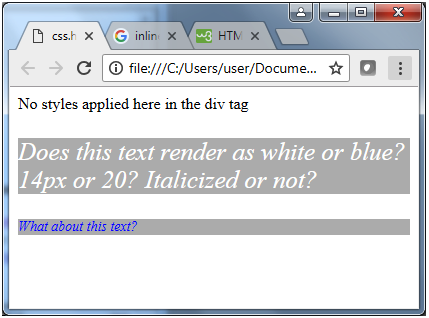
      Notice that, when the webpage renders, any text that is not contained within a style just renders as plain black text on a white background.


      Any text contained within a paragraph tag without an inline style pulls formatting information from the internal stylesheet, which means it is rendered as blue, 14-pixel, italicized text on a silver background. However, when the inline style is used, the internal style overrides and matches properties, while leaving nonconflicting attributes alone, causing the text to render as white, 20-pixel, italicized text on a silver background.


      To Get more formation visit w3 school: click here

      Friday, May 24, 2019

       GITHUB


      INSTALLING GIT FOR LINUX BY TERMINAL
                                   
      INSTALL                 sudo apt-get install git
      USERNAME           git config --global user.name "user_name"
      EMAIL ID                git config --global user.email "email_id"

      After installation you have to create you own profile 


      Why we use git hub : 
      We can add new repositories
      We can do a work as a team
      Can get suggestion from other developpers 
      Communicate with others and join their project


      Terminal command for 
      • git init                                                      : to create a hidden folder
      • git add (file name)  /   git add *               : to send files to the hidden folder
      • git status                                                 : to see the status about files     
      • git commit -m "type the message"          : to set the file before push
      • git  remote add origin (url type your url)  : which url you have to send file
      • git remote remove origin                          : if you type wrong url to clear       
      • git remote -v                                           : to check the connection to url
      • git push -u origin  master                         : to push the file to github


      Codecademy
      Codecademy is an online interactive platform that offers free coding classes in 12 different programming languages including Python, Java, JavaScript, Ruby, SQL, C++, and Sass, as well as markup languages HTML and CSS.
      He site also offers a paid "pro" option that gives users access to a personalized learning plan, quizzes, realistic projects, and live help from advisors.

      Codecademy was founded in August 2011 by Zach Sims and Ryan Bubinski

      As part of the Computer Science Education Week held in December 2013, 
      Codecademy launched their first iOS app called "Hour of Code". The app focuses on the basics of programming, including the same content from the website.

      However this codeacdemy will helpful for the self learners and enthusiast in IT field.


      Atom

      Atom is a text editor software 

      Atom is a free and open-source

      Programming lanqage support
      • C
      • C++
      • C#
      • COBOL
      • CSS
      • GitHub Flavored Markdown
      • Go
      • HTML
      • Java
      • JavaScript
      • Objective-C
      • Perl
      • PHP
      • Property lists
      • Python
      How to install Atom by termnal
      Step 1 : Add repository:
      sudo add-apt-repository ppa:webupd8team/atom


      Step 2 : Update the Repository
      sudo apt-get update


      Step 3 : Install Atom.
      sudo apt-get install atom


      Wednesday, May 15, 2019

      HTML 


      HTML (Hypertext Markup Language) is a text-based approach to describing how content contained within an HTML file is structured. This markup tells a web browser how to display the text, images and other forms of multimedia on a webpage.

      What is html?
      html is mainly used to develop the web . there are two types of web development we can see.
      first is frontend , another backend
      html is the front end development lanquage 

      Frontend design: HTML,CSS

      Web browsers receive HTML documents from a web server or from local storage and render the documents into multimedia web pages.

       HTML describes the structure of a web page semantically and originally included cues for the appearance of the document.


      Commonly used HTML tags


      The role of HTML is to inform a web browser about how the content contained within an HTML file is structured. Commonly used HTML tags include <H1>, which describes a top-level heading; <H2>, which describes a second-level heading; <p> to describe a paragraph; <table>, which describes tabular data; and <ol>, which describes an ordered list of information.

      As you can see from this very short list, HTML tags primarily dictate the structural elements of a page.
      Describing within an HTML tag how an HTML element should be formatted when rendered on a webpage is considered an HTML antipattern. HTML should describe how content is structured, not how it will be styled and rendered within a browser.

      What is well-formed HTML?
      In order for a web browser to display an HTML page without error, it must be provided with well-formed HTML. To be well-formed, each HTML element must be contained within an open tag -- <p> -- and a close tag -- </p>. Furthermore, any new tag opened within another tag must be closed before the containing tag is closed. So <h1><p>well-formed HTML</p></h1> is well-formed HTML, while <h1><p>well-formed HTML</h1></p> is not well-formed HTML.

      HTML syntax standards

      Another syntax rule is that HTML attributes should be enclosed within single or double quotes. There is often debate about which format is technically correct, but the World Wide Web Consortium asserts that both approaches are acceptable.

      How to use and implement HTML

      Because HTML is completely text-based, an HTML file can be edited simply by opening it up in a program such as Notepad++,Atom, Vi or Emacs. Any text editor can be used to create or edit an HTML file and, so long as the file is created with a .html extension, any web browser, such as Chrome or Firefox, will be capable of displaying the file as a webpage.


      HTML Documents
      All HTML documents must start with a document type declaration: <!DOCTYPEhtml>.
      The HTML document itself begins with <html> and ends with </html>.

      The visible part of the HTML document is between <body> and </body>

      For more info:https://www.w3schools.com


      Example for a html code

      <html>
      <head>
      <title> it display on the tittlebar</title>
       </head>
      <body><h1><b> h1 to h6 are the heading elements</h1><b></body>
      <h2>h1 to h6  size of the heading going decrease</h2>
      <h3>New world of word</h3>
      <h4>New world of word</h4>
      <h5>New world of word</h5>
      <h6>New world of word</h6>

      <b>formatting elements</b><br>
      <strong>formatting elements</strong>
      <em>formatting elements</em>
      <mark>formatting elements</mark>
      <small>formatting elements</small>
      <del>formatting elements</del>
      <ins>formatting elements</ins>

      <p>this is used to write a paragraph and
       <br> Element break your line and start with the new line  and we dont need to put ending tag to br
      </p>
      <!-- this is comment-->
      </html>


      Express

      In this tutorial, we will also have a look at the express framework. This framework is built in such a way that it acts as a minimal an...