Saturday, July 6, 2019

MongoDB

Image result for mongodb


What is MongoDB-----:-

MongoDB is a document database with the scalability and flexibility that you want with the querying and indexing that you need

⧫    MongoDB stores data in flexible, JSON-like documents, meaning fields can vary from document to document and data structure can be changed over time

⧫ The document model maps to the objects in your application code, making data easy to work with

⧫ You can make developments easily


Why Use MongoDB?

📄  Document Oriented Storage − Data is stored in the form of JSON style documents.

📄  Index on any attribute

📄  Replication and high availability

📄  Auto-sharding

📄  Rich queries

📄  Fast in-place updates

📄  Professional support by MongoDB

Where to Use MongoDB?

  • Big Data
  • Content Management and Delivery
  • Mobile and Social Infrastructure
  • User Data Management
  • Data Hub

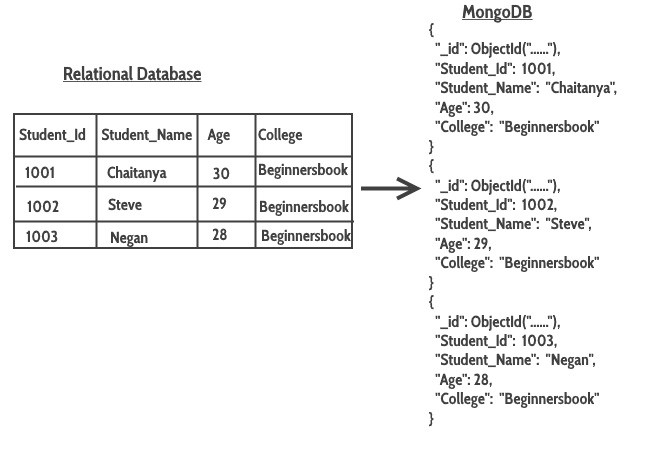
In sql data save as table Mongodb saves as collections.


Basic Commands for the MongoDB

Installation Commands (Ubuntu) :

#1
sudo apt-key adv --keyserver hkp://keyserver.ubuntu.com:80 --recv 9DA31620334BD75D9DCB49F368818C72E52529D4


#2
echo "deb [ arch=amd64 ] http://repo.mongodb.com/apt/ubuntu bionic/mongodb-enterprise/4.0 multiverse" | sudo tee /etc/apt/sources.list.d/mongodb-enterprise.list

#3
sudo apt-get update

#4
sudo apt-get install -y mongodb-enterprise


How to Start 


#Step 1: Start MongoDB  .
sudo service mongodb start
 #Stop MongoDB
sudo service mongodb stop
#  To Start the Server
sudo mongo
# To Start the Client
sudo mongod


Basic Commands 


1. Finding the current database you’re in 

db 

2. Listing databases

Show dbs


3. Go to a particular database
use Database_name

4. Creating a Database
use Database_name     :- use command used for both action

5. Creating a Collection
db.createCollection("myCollection")


6. Inserting Data
db.myCollection.insert({"name": "john", "age" : 22, "location": "colombo"})
 db.myCollection.insertOne(i      {       "name": "navindu",        "age": 22      })
 db.myCollection.insertMany([      {        "name": "navindu",         "age": 22      },         {        "name": "kavindu",  "age": 20      },    { "name": "john doe",  "age": 25,        "location": "colombo"}     ])
7. Querying Data
db.myCollection.find()
 db.myCollection.find().pretty()

8. Updating documents
db.myCollection.update({age : 20}, {$set: {age: 23}})
db.myCollection.update({name: "navindu"}, {$unset: age});

9. Removing a document
db.myCollection.remove({name: "navindu"});

10. Removing a collection
db.myCollection.remove({});


Some  Funtions


Connecting method With Database and server


Image result for mongodb

Thursday, July 4, 2019

            Nodejs                                    
 

↦Node.js is an open-source server environment
↦Node.js allows you to run JavaScript on the server.

Its help to the user to connect the server and Database  likely it works as an intermediate

 A lot of youth aspires to be a most sought after software developer and so goes on to learn the required programming skills to match to the current market and industrial needs. They have broadly two choices to make
To Be A Front-End Developer
To Be A Back-end Developer.

Node js is a backend develop language. if you want to become a Back-end Developer so you have to study this. It's really hard but if you study hard you will get it soon.

This server-side application directly interacts with the database via an application programming interface (API), which pulls, saves, or changes data.
 Node.js which is the most sought after backend scripting language in the current technology market and is becoming the preferred language options for back-end programmers.

Node.js an asynchronous event-driven JavaScript runtime, which is designed to build scalable network applications. It can handle many concurrent connections at a time, where when connection request are made concurrently for each connection a callback is fired. If there is no task to be performed Node will go to sleep.

History of Node.js

Node.js was first conceived in 2009 by Ryan Dahl and was developed and maintained by Ryan which then got sponsored and supported by Joyent. Dahl was not happy the way Apache Http server used to handle a lot of concurrent connections and the way code was being created which either blocked the entire process or implied multiple execution stacks in the case of simultaneous connections. This leads him to create a Node.js project which he went on to demonstrate at the inaugural European JSConf on November 8, 2009. He used Google Google’s V8 JavaScript engine, an event loop, and a low-level I/O API in his project which won lots of hearts and a standing ovation.

Here is how Node.js handles a file request:


  1. Sends the task to the computer's file system.
  2. Ready to handle the next request.
  3. When the file system has opened and read the file, the server returns the content to the client.
What Can Node.js Do?

  1. Node.js can generate dynamic page content
  2. Node.js can create, open, read, write, delete, and close files on the server
  3. Node.js can collect form data
  4. Node.js can add, delete, modify data in your database.

How to install Node.js on ubuntu

Step #1:
sudo apt-get update

Step #2:
sudo apt-get install build-essential libssl-dev

Step #3:
sudo curl https://raw.githubusercontent.com/creationix/nvm/v0.33.11/install.sh | bash

Step #4 (if no curl):
sudo apt-get install curl
https://raw.githubusercontent.com/creationix/nvm/v0.33.11/install.sh | bash

Step #4:
source ~/.profile

Step #5:
nvm --version

Step #6:
nvm install 6.16.0

Step #7:
nvm ls

Step #8:
node --version

Step #9:
npm --version

to install nodemon
:--npm install -g nodemon


Basic commands  for the Nodejs

exports.log =               {
    console: function(msg)  {
        console.log(msg);  },
    file: function(msg)     {
        // log to file here }
                            }
to export module for define by user

some modules:
http               :   http includes classes, methods  to create Node.js http server.
url                 :   url module includes methods for URL resolution and parsing.
querystring   :  querystring module includes methods to deal with query string.
path              :   path module includes methods to deal with file paths.
fs                  :     fs module includes classes, methods, and events to work with file I/O.
util                :   util module includes utility functions useful for programmers.


to create server:

var http = require('http');         // 1 - Import Node.js core module

var server = http.createServer(function (req, res) { } );   
 // 2 - creating server //handle incomming requests here..

Url module:

var url = require('url');
var adr = 'http://localhost:8080/default.htm?year=2017&month=february';
var q = url.parse(adr, true);

console.log(q.host);             //returns 'localhost:8080'
console.log(q.pathname);    //returns '/default.htm'
console.log(q.search);         //returns '?year=2017&month=february'

var qdata = q.query;            //returns an object: { year: 2017, month: 'february' }

console.log(qdata.month); //returns 'february'


Saturday, June 15, 2019

Javascript


Java script is used to programme the behaviour of the website. Its easy to handling and a developer should learn this language.

What is javascript? 
Javascript is a scripting language, mostly used on the web. It's used to increase HTML pages.
commonly found in embedded in Html code. Javascript an interpreted language. Thus, it doesn't
need to be compiled. Javascript renders the web pages by interactive and dynamic fashion.
This allowing the pages to react to events, exhibit special effects, accept variable text, validate data, detect user's browsers.etc.

Many desktop and server programs use JavaScript. Node.js is the best known. Some databases, like MongoDB and CouchDB, also use JavaScript as their programming language.

What can do javascript for u
☝ Javascript is very easy to implement. All you need to do is put your code in the HTML document and tell the browser that is javascript.

☝ Javascript work on a web users computer - even when they are offline.  Javascript allows you to create highly responsive interfaces that improve the user experience


 JavaScript can load content into the document if and when the user needs it, without reloading the entire page


☝ JavaScript can test for what is possible in your browser and react accordingly 

Uses of javascript

👉 Web development
👉 Web applications
👉 Presentations
👉 Server application
👉 Web servers 
👉 Games
👉 Arts
👉 Smartwatch applications
👉 mobile applications
👉 Flying Robots

Javascript must be inserted between <script>and </script> tags 

In javascript we can display data in different ways;

  1. Writing into an HTML element, using innerHTML.
  2. Writting into the html output using document.write()
  3. Writting into an html alert box , window.alert()
  4. Writting into a browser console , console.log()
mostly innerHTML  is used to call the functions.

<script>
document.getElementById("demo").innerHTML = 5 + 6;
</script>

Javascript statements
A list of instructions is to be executed by a computer is called"Computer Programme"
That the programming instructions are called Statements.
<script>
var a ,b,c;
a=5;
b=4;
c=a+b
</script>


script>
var x, y;
x = 5 + 6;
y = x * 10;
document.getElementById("demo").innerHTML = y;

</script>


in programming, just like in algebra, we use variables (like price1) to hold values.

In programming, just like in algebra, we use variables in expressions (total = price1 + price2).

From the example above, you can calculate the total to be 11.


JavaScript Identifiers

All JavaScript variables must be identified with unique names.

These unique names are called identifiers.

Identifiers can be short names (like x and y) or more descriptive names (age, sum, total volume).

The general rules for constructing names for variables (unique identifiers) are:

Names can contain letters, digits, underscores, and dollar signs.
Names must begin with a letter
Names can also begin with $ and _ (but we will not use it in this tutorial)
Names are case sensitive (y and Y are different variables)

Reserved words (like JavaScript keywords) cannot be used as names

Value = undefined
In computer programs, variables are often declared without a value. The value can be something that has to be calculated or something that will be provided later, like user input.

A variable declared without a value will have the value undefined.

The variable carName will have the value undefined after the execution of this statement:


<script>
var carName;
document.getElementById("demo").innerHTML = carName;

</script>

Arithmetic operators

Operator   Description
   
+ Addition
- Subtraction
* Multiplication
**             Exponentiation (ES2016)
/ Division
% Modulus (Division Remainder)
++ Increment
-- Decrement


Comparition Operator

Operator  Description

==             equal to

===           equal value and equal type

!=              not equal

!==            not equal value or not equal type

>               greater than

<               less than

>=             greater than or equal to

<=             less than or equal to

?               ternary operato

<script>
var a = 3;
var x = (100 + 50) * a;
document.getElementById("demo").innerHTML = x;
</script>
out put:450


JavaScript variables can hold many data types: numbers, strings, objects and more:

JavaScript Arrays
JavaScript arrays are written with square brackets.

Array items are separated by commas.

The following code declares (creates) an array called cars, containing three items (car names):
<script>
var cars = ["Saab","Volvo","BMW"];
document.getElementById("demo").innerHTML = cars[0];
</script>


Java script Functions

A JavaScript function is a block of code designed to perform a particular task.

A JavaScript function is executed when "something" invokes it (calls it).


<script>
function myFunction(p1, p2) {
 return p1 * p2;
}
document.getElementById("demo").innerHTML = myFunction(4, 3);
</script>


JavaScript Function Syntax
A JavaScript function is defined with the function keyword, followed by a name, followed by parentheses ().

Function names can contain letters, digits, underscores, and dollar signs (same rules as variables).

The parentheses may include parameter names separated by commas:
(parameter1, parameter2, ...)

The code to be executed, by the function, is placed inside curly brackets: {}

  • Function parameters are listed inside the parentheses () in the function definition.
  • Function arguments are the values received by the function when it is invoked.
  • Inside the function, the arguments (the parameters) behave as local variables.


Function Invocation
The code inside the function will execute when "something" invokes (calls) the function:

  • When an event occurs (when a user clicks a button)
  • When it is invoked (called) from JavaScript code
  • Automatically (self invoked)

You will learn a lot more about function invocation later in this tutorial.


Function Return
When JavaScript reaches a return statement, the function will stop executing.

If the function was invoked from a statement, JavaScript will "return" to execute the code after the invoking statement.

Functions often compute a return value. The return value is "returned" back to the "caller":


<script>
var x = myFunction(4, 3);
document.getElementById("demo").innerHTML = x;

function myFunction(a, b) {
  return a * b;
}
</script>

Objects

Objects can also have methods.

Methods are actions that can be performed on objects.

Methods are stored in properties as function definitions.

Var person = {
 firstName: "John",
 lastName : "Doe",
 id       : 5566,
 fullName : function() {
   return this.firstName + " " + this.lastName;
 }
};


The this Keyword


In a function definition, this refers to the "owner" of the function.

In the example above, this is the person object that "owns" the fullName function.

In other words, this.firstName means the firstName property of this object.

JavaScript Events

HTML events are "things" that happen to HTML elements.

When JavaScript is used in HTML pages, JavaScript can "react" on these events.

HTML Events


An HTML event can be something the browser does, or something a user does.

Here are some examples of HTML events:
  • An HTML web page has finished loading
  • An HTML input field was changed
  • An HTML button was clicked

Often, when events happen, you may want to do something.

JavaScript lets you execute code when events are detected.

HTML allows event handler attributes, with JavaScript code, to be added to HTML elements.


Event                Description
onchange         An HTML element has been changed
onclick              The user clicks an HTML element
onmouseover   The user moves the mouse over an HTML element
onmouseout     The user moves the mouse away from an HTML element
onkeydown       The user pushes a keyboard key
onload              The browser has finished loading the page


String Methods and Properties

Primitive values, like "John Doe", cannot have properties or methods (because they are not objects).

But with JavaScript, methods and properties are also available to primitive values, because JavaScript treats primitive values as objects when executing methods and properties.

String Length

Finding a String in a String

Searching for a String in a String

Extracting String Parts
  • slice(start, end)
  • substring(start, end)
  • substr(start, length)
Replacing String Content

Converting to Upper and Lower Case

The concat() Method

String.trim()

Extracting String Characters
  • charAt(position)
  • charCodeAt(position)
  • Property access [ ]
Converting a String to an Array


Saturday, June 1, 2019

Bootstrap

Bootstrap is a free and open-source front end development framework for the creation of websites and web apps. The Bootstrap framework is built on HTML, CSS, and JavaScript (JS) to facilitate the development of responsive, mobile-first sites and apps.

What is Bootstrap?
Bootstrap is a free front-end framework for faster and easier web development
Bootstrap includes HTML and CSS based design templates for typography, forms, buttons, tables, navigation, modals, image carousels and many other, as well as optional JavaScript plugins. Bootstrap also gives you the ability to easily create responsive designs

Responsive design makes it possible for a web page or app to detect the visitor’s screen size and orientation and automatically adapt the display accordingly; the mobile first approach assumes that smartphones, tablets and task-specific mobile apps are employees' primary tools for getting work done and addresses the requirements of those Bootstrap CDN 
If you don't want to download and host Bootstrap yourself, you can include it from a CDN (Content Delivery Network).

MaxCDN provides CDN support for Bootstrap's CSS and JavaScript. You must also include jQuery:s in design.

Advantages of Bootstrap:

Easy to use: Anybody with just basic knowledge of HTML and CSS can start using Bootstrap
Responsive features: Bootstrap's responsive CSS adjusts to phones, tablets, and desktops
Mobile-first approach: In Bootstrap 3, mobile-first styles are part of the core framework

Browser compatibility: Bootstrap is compatible with all modern browsers (Chrome, Firefox, Internet Explorer, Edge, Safari, and Opera)

Bootstrap includes user interface components, layouts and JS tools along with the framework for implementation. The software is available precompiled or as source code.


Mark Otto and Jacob Thornton developed Bootstrap at Twitter as a means of improving the consistency of tools used on the site and reducing maintenance. The software was formerly known as Twitter Blueprint and is sometimes referred to as Twitter Bootstrap.

Bootstrap CDN 
If you don't want to download and host Bootstrap yourself, you can include it from a CDN (Content Delivery Network).

MaxCDN provides CDN support for Bootstrap's CSS and JavaScript. You must also include jQuery:

One advantage of using the Bootstrap CDN:
Many users already have downloaded Bootstrap from MaxCDN when visiting another site. As a result, it will be loaded from cache when they visit your site, which leads to faster loading time. Also, most CDN's will make sure that once a user requests a file from it, it will be served from the server closest to them, which also leads to faster loading time.


Sunday, May 26, 2019

CSS


Styling HTML with CSS

This definition explains the meaning of CSS (cascading style sheets) and how using them with HTML pages is a user interface (UI) development best practice that complies with the separation of concerns design pattern.


    • CSS stands for Cascading Style Sheets.
    • CSS describes how HTML elements are to be displayed on screen, paper, or in other media.
    • CSS saves a lot of work. It can control the layout of multiple webpages all at once.

      CSS can be added to HTML elements in 3 ways:

      Inline - By using the style attribute in HTML elements
                             :- An inline CSS is used to apply a unique style to a single HTMLelement.
                                   eg:  <h1 style="color:blue;">This is a Blue Heading</h1>


      Internal - By using a <style> element in the <head> section
                             :- An internal CSS is used to define a style for a single HTML page.
                                     An internal CSS is defined in the <head> section of an HTML
                                                   page, within a <style> element:
                               
                                              <head>
                                                  <style>
                                                          body {background-color: powderblue;}

                                                          h1 {color: blue;}
                                                           p {color: red;}
                                                   </style>
                                                 </head>


      External - By using an external CSS file.An external style sheet is used to define the style for                                     manyHTMLpages.With an external style sheet, you can change the look of an entire
                                     web site, by changing one file.
                     
                                           <html>
                                                  <head>
                                                           <link rel="stylesheet" href="styles.css">
                                                   </head>
                                                          <body>


      CSS is the standard and preferred mechanism for formatting HTML pages.


      Conforming with the separation of concerns design pattern and best practice, cascading style sheets provide a central location in which information about what various fonts, foreground colors, background colors, italicization and emphasization should be applied to various HTML elements within a webpage. Cascading style sheets can also control how various parts of a page, such as the header, footer, body, article content, sections and asides, are laid out on the page. This is extremely helpful when content must be laid out in a dramatically different fashion depending upon whether it is being viewed on a desktop, tablet or a smartphone.

      Implementing CSS formatting

      The cascading nature of CSS files is attributed to the fact that style information for a webpage can be defined in any of three different places, also known as style levels.

      The preferred practice is to put style information in a separate file with a .css extension. Using formatting information contained within an external cascading style sheet is accomplished via the HTML link tag. A webpage can link to zero, one or may different external CSS files by using multiple link tags.

      <link rel="stylesheet" type="text/css" href="what-is-css.css">


      However, on smaller projects or in cases where a given webpage is interested in overriding some of the style information in an external CSS file, style information can be written within a <style> tag inside the webpage. This is known as an internal style level. Internal style level information within a webpage will override any style information provided by an external cascading style sheet.

      Cascading style rules

      Furthermore, all HTML5 tags have a style property that one can use to override any style information defined at either the page style level or in an external style sheet. Using an HTML tag to define CSS information is referred to as an inline style. The fact that style rules dictate that parent-level styles are overridden by page-level styles and page-level styles are overridden by tag-level styles is what is meant by style sheets being cascading.

      Style sheet language
      CSS syntax is relatively simple. The name of the element to style, referred to as the CSS selector, is followed by braces, within which various attributes, such as font-size and background-color are assigned values.

      CSS selectors
      CSS selectors can be HTML tags, class attributes assigned to HTML tags and even states of a given element, such as the disabled state of an input field or the hover state of an anchor link. Making it possible to customize the style of components depending upon their state or how they are classified on a page provides the graphic designer a great deal of flexibility in determining how a webpage will be rendered by the browser.


      CSS example


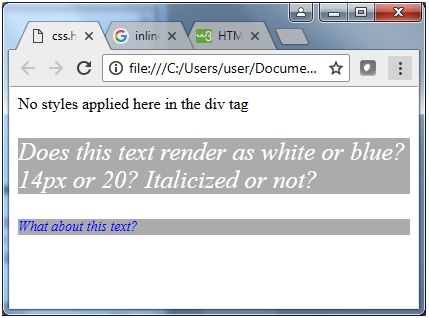
      Notice that, when the webpage renders, any text that is not contained within a style just renders as plain black text on a white background.


      Any text contained within a paragraph tag without an inline style pulls formatting information from the internal stylesheet, which means it is rendered as blue, 14-pixel, italicized text on a silver background. However, when the inline style is used, the internal style overrides and matches properties, while leaving nonconflicting attributes alone, causing the text to render as white, 20-pixel, italicized text on a silver background.


      To Get more formation visit w3 school: click here

      Friday, May 24, 2019

       GITHUB


      INSTALLING GIT FOR LINUX BY TERMINAL
                                   
      INSTALL                 sudo apt-get install git
      USERNAME           git config --global user.name "user_name"
      EMAIL ID                git config --global user.email "email_id"

      After installation you have to create you own profile 


      Why we use git hub : 
      We can add new repositories
      We can do a work as a team
      Can get suggestion from other developpers 
      Communicate with others and join their project


      Terminal command for 
      • git init                                                      : to create a hidden folder
      • git add (file name)  /   git add *               : to send files to the hidden folder
      • git status                                                 : to see the status about files     
      • git commit -m "type the message"          : to set the file before push
      • git  remote add origin (url type your url)  : which url you have to send file
      • git remote remove origin                          : if you type wrong url to clear       
      • git remote -v                                           : to check the connection to url
      • git push -u origin  master                         : to push the file to github


      Express

      In this tutorial, we will also have a look at the express framework. This framework is built in such a way that it acts as a minimal an...